MarketWatch
- 4.2
- Rating
- 1.00M
- Installs
- Free
- Price

 Analysis by App-foxy
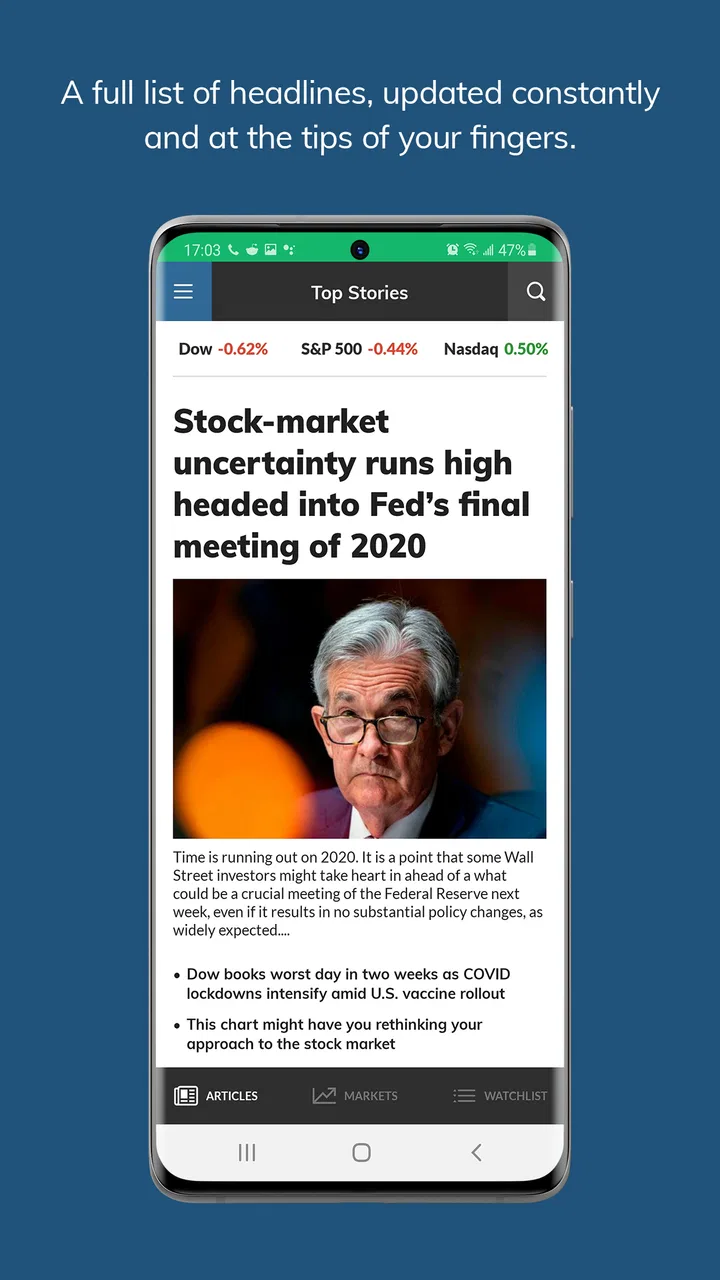
I use financial apps differently depending on whether I am checking a headline, watching a market move, or trying to understand why an investment is changing. MarketWatch fits best into that first layer: it gives me a focused place for financial news, market information, and investing analysis without asking me to turn every check into a full research session. After spending time with it, I see it as a useful companion for staying informed, especially when I want context around a market event rather than only a price on a screen.
The app is free to download and is published by Dow Jones & Company, Inc. It belongs to the finance category and carries an Everyone 10+ content rating. Its broad reach is reflected in more than a million installs, while its average score sits at 4.2 from roughly fifty thousand ratings. Those figures suggest a mature, widely used product, but they do not remove the need to decide whether its style of information suits the way you invest.
How I use MarketWatch in a normal day
My basic workflow starts with a quick scan rather than a long reading session. I open the app to see what is moving in the financial world, look for stories connected to the markets I follow, and then decide whether a particular article deserves more attention. That order matters. If I begin by chasing individual symbols, I can easily lose the wider story; if I begin with the news, I have a better chance of understanding whether a move is connected to company news, an economic development, or a broader change in sentiment.
You May Also Like

 Blood Strike: 2.5 Anniversary
Blood Strike’s Loadouts Turn Every Drop Into a Tactical Gamble
A close look at Blood Strike’s custom loadouts: how fast access to signature weapons reshapes its battle royale rhythm, rewards preparation, and narrows the gap between fights.

 Pandora - Music & Podcasts
Pandora’s Music Is Easy to Start, but Harder to Recover
Pandora’s strength is its low-effort path from a seed to a station. Its weak spot is how much confidence it asks you to place in connection, setup, and quiet recovery.

 8 Ball Pool
 Is Built on Rivalries, Rematches, and Routine
A close look at the rivalries, rematches, shared routines, and unanswered safety questions that turn a quick pool match into a persistent mobile community.

 Samsung Music
’s Quiet Strength Is Playing What You Already Own
Its reach comes less from spectacle than from dependable access to a personal library. That simplicity is both the app’s strongest retention engine and its ceiling.

 AccuWeather: Weather Radar
AccuWeather Review: A Quick, Clear Forecast for Everyday Decisions
For everyday plans, the best forecast is the one you can understand quickly. AccuWeather makes rain timing, radar, and local conditions easy to act on, with a few trade-offs.

 Hill Climb Racing
Why Hill Climb Racing Still Turns Crashes Into One More Run
A tiny car, a bumpy hill and one more upgrade: Hill Climb Racing keeps resurfacing because its simple chaos makes every near-miss feel personal.
More From Our News Desk



The strongest part of this routine is the connection between financial news and market data. A price change by itself tells me what happened, but an article can help explain the event and show which industries or companies may be affected. I still treat that explanation as a starting point, not as a complete investment thesis. MarketWatch is useful for forming questions, identifying subjects to research, and keeping up with the conversation around the markets. It is not a substitute for reading official company documents or checking the details of a trade before placing it.
For an everyday example, imagine that I hear during breakfast that a company I follow has fallen sharply. I can use the app to check whether there is a related news story, read the market reaction, and compare the event with the broader direction of the sector. That is more helpful than repeatedly refreshing a quote with no context. If the story raises a serious question, I move to a more specialized source before making a decision. This simple habit prevents the common mistake of confusing fast information with complete information.
I also find the app more useful when I give each visit a purpose. A short morning check can cover the main headlines and the market picture. A later visit might be reserved for one article that affects a company or theme I already understand. Without that discipline, financial news apps can encourage endless scrolling, where every new headline feels urgent even when it has no effect on my own plan.
What the free experience is good at
The free access makes MarketWatch easy to try as a daily information tool. I do not need to commit money simply to see whether its presentation works for me. That is important for casual investors, students, and people who are beginning to follow markets but are not ready to build a large collection of paid services.
At the same time, the app includes in-app purchases priced from $19.99 to $22.99 per item. I would therefore decide on the value of any paid option based on how often I use the service and whether the additional access genuinely improves my routine. Someone who only checks a few headlines each week may find the free experience sufficient. A reader who depends on financial journalism every day may view the paid route differently, but it should still be judged against alternatives such as a brokerage app, a dedicated market-data service, or a general news subscription.
One practical tip is to avoid treating the free starting point as a complete portfolio system. MarketWatch works well beside a brokerage account, not necessarily in place of one. I use it to understand the environment and then use the appropriate account or research source for holdings, orders, tax information, and portfolio decisions. Keeping those jobs separate makes the workflow clearer and reduces the risk of acting on a headline before checking the actual position.
Settings and habits that make the app calmer
When I install a finance app, I check its notification controls before doing anything else. Market information can become distracting when every alert feels like a call to action. In MarketWatch, I would keep only the notifications that support a clear purpose, such as major news relevant to the markets or subjects I actively follow, and reduce anything that turns the phone into a constant stream of interruptions. The exact choices depend on the current app configuration and my interests, but the principle is consistent: alerts should support a plan rather than create one.
I also review how I organize the subjects I follow. A long, unedited list is less useful than a small group divided mentally into categories: companies I own, companies I am researching, broader market themes, and subjects I am watching only for learning. That distinction is a surprisingly effective filter. It stops a speculative idea from receiving the same emotional weight as an actual holding and makes it easier to decide which stories deserve attention.
Another setting worth checking is the reading experience itself. I prefer to open an article with a specific question in mind: What changed? Who is affected? Is this a short-term reaction or a development that could matter later? Reading with those questions helps me separate reporting from my own assumptions. I do not need to agree with every interpretation in an article to benefit from it; I need to understand what is being reported and what still requires verification.
The most useful setting is often a personal boundary rather than a button: decide when you will check the app and what would justify checking it again. This is especially valuable for long-term investors. Constant monitoring can make ordinary price movement feel like a problem, while a scheduled review keeps news in proportion. MarketWatch can support either behavior, so the quality of the experience depends heavily on how deliberately I use it.
Faster patterns for repeat visits
Experienced use is less about tapping quickly and more about repeating a reliable sequence. My preferred pattern is headline scan, market context, focused article, then an external verification step if the information could affect a financial decision. The sequence is short enough for a busy morning but structured enough to prevent a headline from becoming an impulsive trade.
A second pattern is to read the headline list before opening the most dramatic story. The biggest movement or strongest wording naturally attracts attention, yet it may not be the item most relevant to my portfolio. By scanning first, I can choose based on relevance rather than surprise. This small change makes the app feel more like a research aid and less like an alarm system.
I also use a two-pass approach with longer articles. On the first pass, I look for the central event, the companies or markets involved, and the time frame. On the second, I examine the details that could change my interpretation. This is faster than trying to memorize every paragraph and more reliable than reading only the opening lines. It is particularly helpful when several stories are connected to the same economic theme.
For people who follow many companies, a simple note-taking habit adds value that the app itself cannot provide. I record why a story mattered when I read it and what question it created. Later, I can see whether my original concern was resolved or whether I was reacting emotionally. MarketWatch supplies the flow of information; the personal record supplies continuity. Together, they create a more thoughtful process than browsing disconnected headlines.
There is also a useful trade-off between speed and depth. The app is convenient for discovering what deserves attention, but convenience can encourage shallow reading. If I have only a minute, I use it for orientation. If I am considering an investment decision, I slow down and move beyond the app. That boundary is one of the clearest ways to use MarketWatch responsibly.
Where it differs from brokerage and specialist apps
A brokerage app is usually the natural place to see positions, available cash, orders, and account-specific information. MarketWatch has a different role. Its value comes from the editorial and market-information side, so I turn to it when I want to understand the news environment rather than execute a transaction. The difference is important because a brokerage interface can make every piece of information feel connected to an immediate action, while a news-focused app gives me more distance.
Dedicated market-data tools can be better for users who need highly detailed charts, technical studies, alerts tied to precise conditions, or specialized instruments. MarketWatch is more approachable when my goal is to combine readable reporting with a general view of the markets. I would not choose it as my only tool for active trading, where speed, depth, and execution features matter more than a broad news workflow.
General news apps may cover business stories, but their financial coverage is often mixed into politics, technology, culture, and world news. MarketWatch is more focused, which saves time when finance is the subject I actually want. The trade-off is that a specialized financial feed can narrow my attention. I still need to look outside it when a market story depends on legal, scientific, geopolitical, or industry details that financial reporting alone cannot fully explain.
This is why I recommend using the app as a middle layer. It is more focused than a general news reader and less transaction-oriented than a brokerage. That position makes it valuable for investors who want regular context, but less compelling for someone seeking a single all-in-one platform.
Limits that matter before relying on it
The first limitation is the natural tension between immediacy and certainty. Real-time financial coverage is useful because it arrives while events are developing, but early reporting can leave important details unresolved. I never treat a fast article as final proof of what a company, market, or investment will do next. The app helps me notice an event; it does not remove the need for judgment.
The second limitation is that news can create a false sense of completeness. Even a well-written article usually covers a particular angle. It may explain a catalyst without covering valuation, balance-sheet strength, competing risks, or my own time horizon. I therefore ask what the article leaves outside its frame. That question is one of the best ways to avoid making a large decision from a small piece of information.
Paid access is another consideration. Since optional purchases sit in the range of about twenty to twenty-three dollars per item, I would not activate one casually. I would first use the free experience long enough to understand my reading habits, then compare the cost with other financial publications and research tools I already use. The right choice depends less on the headline price than on whether I return often enough to make the added access worthwhile.
There is also a suitability issue. MarketWatch is not the right choice for someone who wants only automatic budgeting, bill tracking, banking, or portfolio rebalancing. It is also not ideal as the sole resource for professional-level market analysis. Users who need a very narrow technical workflow may be happier with a specialist platform, while users who want personal money management should look toward an app designed for that purpose.
Finally, the app’s usefulness depends on the reader. If I follow too many topics, the information becomes noisy. If I open it only when markets are falling, I may develop a distorted view of investing. A repeatable schedule, a limited watchlist, and a rule to verify important claims do more to improve the experience than simply installing another finance tool.
Who will get the most from it
I would recommend MarketWatch to a person who wants a dependable financial news routine, follows companies or market themes, and prefers explanations alongside market information. It is especially suitable for an investor who already has a separate place for transactions but wants a clearer way to understand what may be influencing the market.
It can also help newer investors learn how financial stories are framed. By comparing a headline with the market reaction and then asking what information is still missing, a beginner can develop better research habits. The app does not turn that process into a lesson plan, but its combination of reporting and market coverage gives users material to work with.
I would be more cautious recommending it to someone who dislikes news-driven investing or feels anxious when prices move. In that case, frequent financial headlines may encourage unnecessary decisions. A simpler long-term plan with occasional reviews could be healthier. Likewise, active traders should compare it with tools built around execution and detailed data before making it central to their workflow.
My final view after building a routine around it
MarketWatch succeeds when I use it as an information checkpoint rather than an investment autopilot. Its free entry, focused financial coverage, and connection between news and market context make it easy to include in a daily or weekly routine. The app has been available since August 13, 2013, and its current version is 7.9.23, which gives it the feel of an established product rather than a newly tested experiment. It supports devices running Android 8.0 or later.
My recommendation is straightforward: install it if you want to understand what is happening in the markets and are willing to separate discovery from decision-making. Keep your alerts selective, maintain a manageable set of subjects, and verify anything that could change your money. If you need banking tools, advanced trading functions, or a complete investment-management system, choose a more specialized alternative instead.
For me, the winning habit is simple: use MarketWatch to ask better questions, not to replace the answers. That makes it a practical finance app for informed readers, while keeping its limitations visible. Used with that discipline, it earns a regular place beside—not inside—the tools I use to manage actual investments.
FAQs for MarketWatch
01What features does the MarketWatch app offer?
The MarketWatch app provides users with up-to-date financial news, stock market data, and investment insights. It includes real-time market quotes, customizable watchlists, and breaking news notifications. Users can access in-depth analysis and commentary on financial markets, making it a comprehensive tool for investors and market enthusiasts alike.
02Is the MarketWatch app free to use?
Yes, the MarketWatch app is free to download and use. It offers a range of features at no cost, although there are optional in-app purchases available. Some advanced features or ad-free experiences may require a subscription. Users can choose to enhance their experience based on their needs and preferences.
03How often is the information updated in the MarketWatch app?
The MarketWatch app provides real-time updates on market data and financial news. Stock quotes and news articles are refreshed continually to ensure users have access to the latest information. This makes it a reliable tool for those needing timely insights into market movements and financial events.
04Can I customize notifications in the MarketWatch app?
Yes, the MarketWatch app allows users to customize their notifications. You can choose to receive alerts for specific stocks, market movements, or breaking news events. This feature ensures that you only receive the information that is most relevant to your investment strategy or interests, keeping you informed without overwhelming you.
05Is the MarketWatch app available on both Android and iOS?
Absolutely, the MarketWatch app is available for both Android and iOS devices. Users can download it from the Google Play Store or the Apple App Store. This cross-platform availability ensures that users can access vital financial information regardless of their preferred device, providing flexibility and convenience.
Pros
- Real-time market updates and news.
- User-friendly interface for quick navigation.
- Customizable watchlists for tracking stocks.
- Comprehensive data on global markets.
- Alerts for important market movements.
Cons
- Ads can be intrusive at times.
- Some features require a subscription.
- Occasional lag in data refresh.
- Limited in-depth analysis tools.
- No offline mode for article reading.

MarketWatch
Gallery